This article answers common questions about implementing In-App Purchases, receipt validation, whether to use StoreKit, and more.
To learn more about Apple App Store Receipt validation of Apple App Store receipts without Apple’s servers, let’s start with the basics:
What do you need to start with in-app purchases?
You should be familiar with in-app Purchases and StoreKit.
- You need to enroll in the Apple Developer Program
- Have a device for testing
- Get access to the iOS Developer Center and App Store Connect.
Types of in-app purchases
There are four types of in-app purchases:
- Consumables are used once and are depleted. For example, coins.
- Non-Consumable – are used once but do not expire. For example, a movie in a video app.
- Auto-Renewable Subscriptions – access to services with periodic payment. For example, a monthly subscription to Spotify.
- Non-Renewing Subscriptions – access to services for a limited period. There is no auto-renewal, so users need to renew it on their end.
Note you can add a free trial with a specific duration to a subscription.
You have heard that some users do not want to pay for software and try to get access to app features, avoiding in-app purchases. When a user makes an in-app purchase, the AppStore creates a receipt.
What is an App Store Receipt?
In-app purchases provide a convenient way to monetize in-app content and features within your app.
To provide access to your content, you must pass a receipt through the receipt validation (verifyReceipt) endpoint.
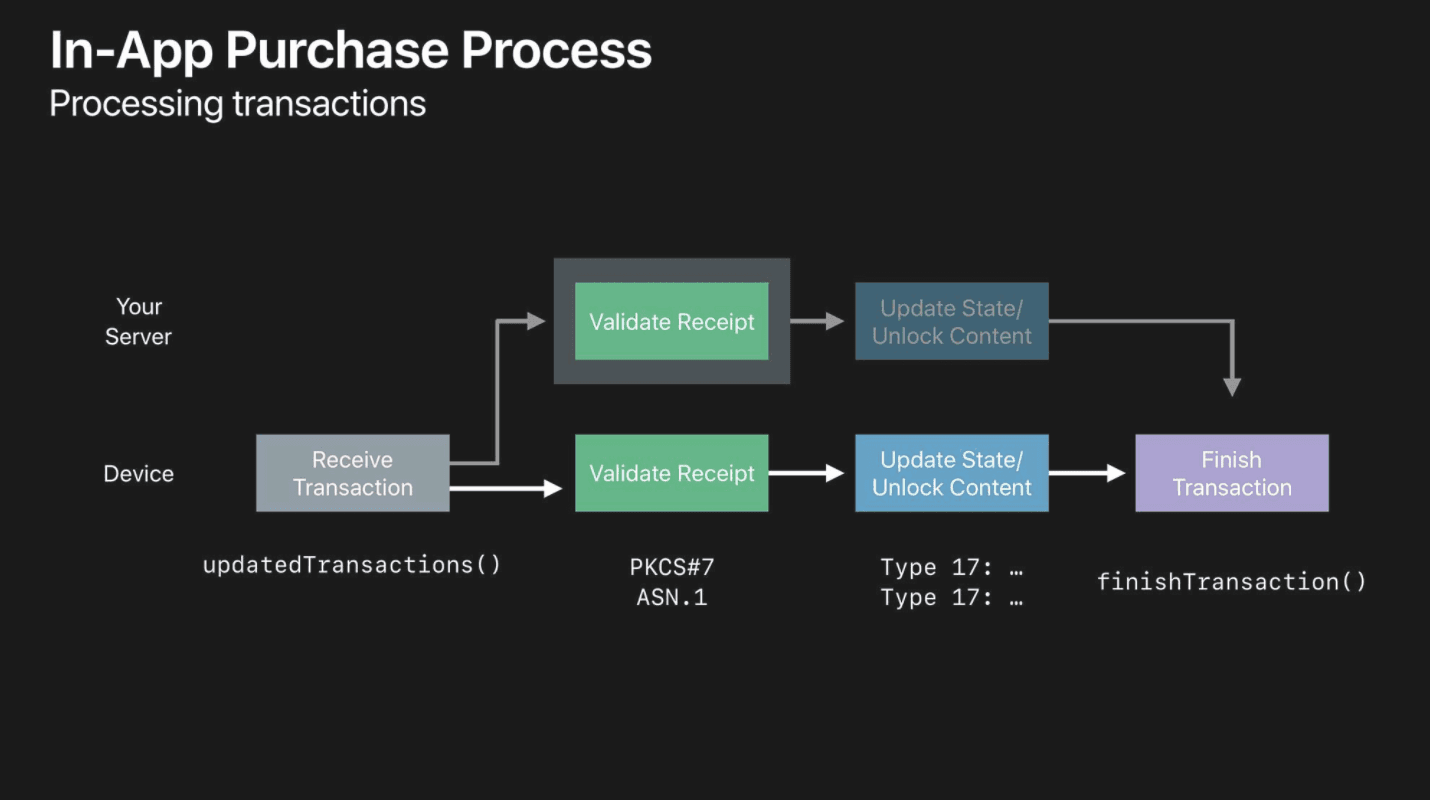

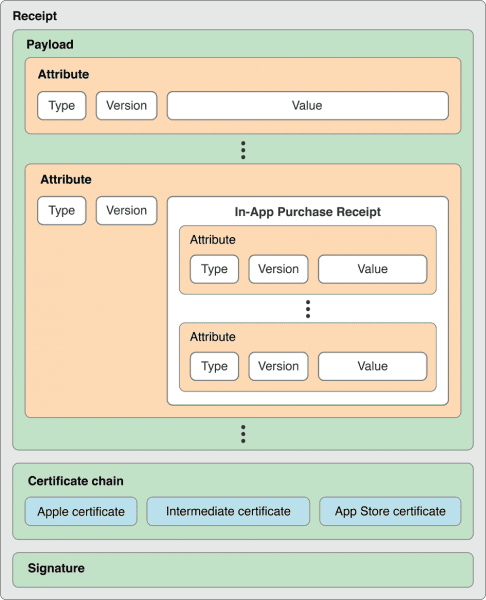
A receipt is an encrypted file signed with an Apple certificate.
Let’s have a look at the receipt structure.
To validate purchases, you need to verify receipts on your server or the device. If you work with auto-renewable subscriptions, the App Store can notify your server of key subscription events.
To retrieve the receipt data (appStoreReceiptURL) from the app on the device, use the appStoreReceiptURL = Bundle.main.appStoreReceiptURL
Is it necessary to validate receipts?
Once you start using in-app purchases, for example, if you use auto-renewable subscriptions, you need to check when they expire to provide or block access to your service/content. This is also used when your users need to restore their purchases, for example, if your user reinstalls your app.
How do you validate receipts?
Please take a look at our new guide on how to decode receipts.
There are two ways:
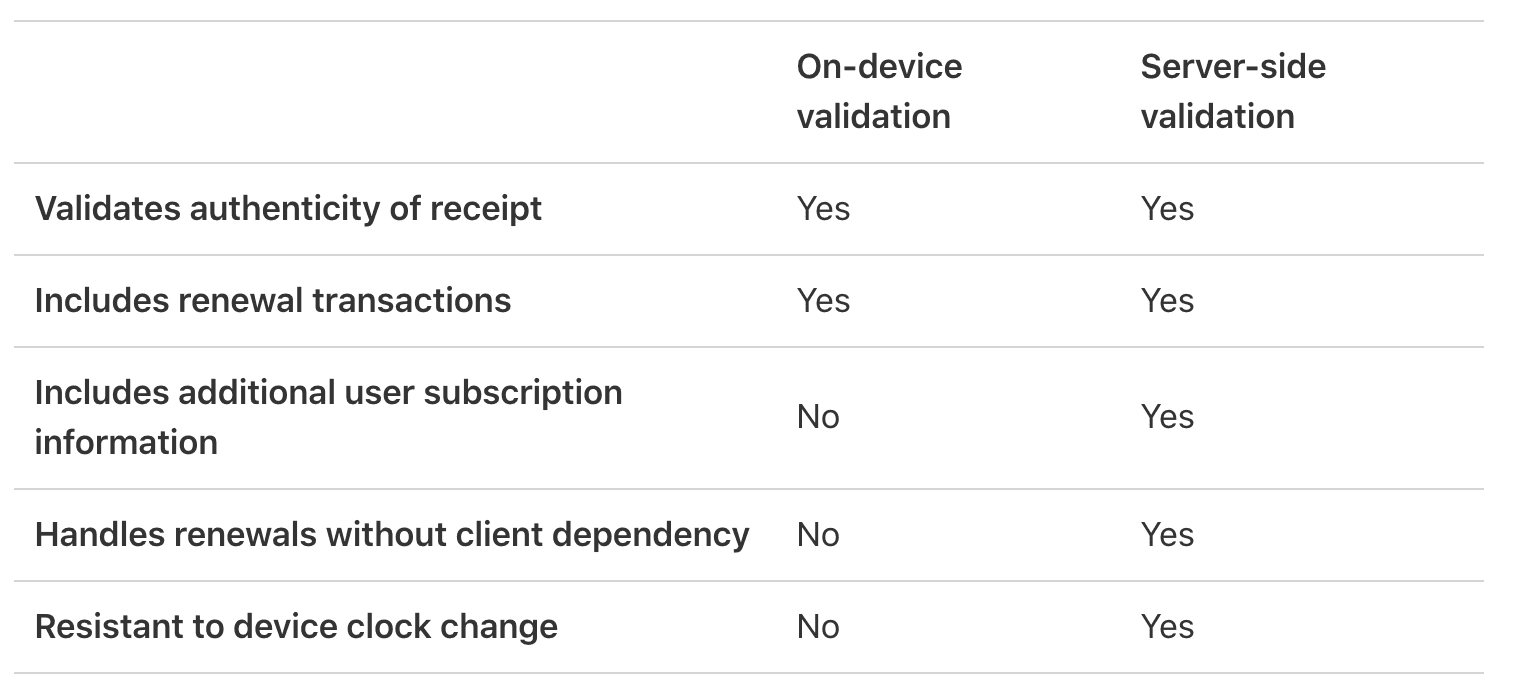
- Local validation, On-device receipt validation
- Server-side receipt validation with the App Store
This table shows the difference between these methods for auto-renewable subscriptions:
What is a Shared Secret?
Apple uses an app-specific key called Shared Secret to receive receipts for auto-renewable subscriptions. Using this key allows developers to verify in-app purchases.
To know how to get it, you can use this guide.
How do you implement in-app purchases?
There are at least three options:
Build your secure server
Pros: not sure if it is valuable, but you make the validation process on your end.The cons are that you need to spend time building your server and supporting it when changes come, which requires time and additional costs. Receipt Validation is a tiny part of your app, and it looks like it is better to focus on your main product than spend time building your server.
SwiftyStoreKit
SwiftyStoreKit is a framework for implementing in-app purchases without server verification.
Pros: Simple and seamless implementation without building your server.Cons: Apple does not recommend this method. The verification process is done on the device side.
Qonversion – infrastructure for apps with subscriptions and in-app purchases
Pros: Server-side Receipt Validation—no code required. Customer management platforms, subscription analytics, real-time dashboards, and third–party integrations send revenue data to analytics, marketing, and attribution tools.Cons: If your monthly revenue exceeds $15k, you pay $1 for each additional $1000.
For example, if you earn $30k, you pay $0 for the first $15k and ($1 x 15) for the next $15k, for a total bill of $15.
If you choose your server or Qonversion, you can use new Properties from Apple without updating your app. For example promotional_offer_id, subscription_group_identifier or grace_period_expires_date.
Where is the documentation for all properties of latest_receipt_info?
The complete list of responseBody.Latest_receipt_info you can find here.
Is it possible to validate a specific receipt online?
Yes, you can use this tool – iOS receipt validation checker. Do not forget to save it to your bookmarks.
How to test in-app purchases?
You can do it easily in the Sandbox environment. You need to purchase or restore it while testing the app installed with Xcode or TestFlight. Important: The Apple Review team reviews apps in the sandbox.Please review our article about StoreKit Testing In Xcode 12 and iOS 14.
Apple receipt validation complexity
Implementing in-app subscriptions and validating receipts is difficult and time-consuming. It requires building a server and jumping to the StoreKit documentation. Qonversion.io offers a simple solution that allows fast in-app subscription implementation with no server-side code required.
You can learn more about implementing in-app subscriptions with Qonversion here.

Eugene
Qonversion Team
Eugene contributes expertise on mobile app development and monetization.