To manage your subscriptions on iOS or to integrate Qonversion SDK, you’ll need a dependable method to validate purchase receipts and control user access. We get questions like “Where can I find the Shared Secret?” and “How do I generate a Shared Secret?”. It’s pretty straightforward, actually.
In this article, I’ll tell you everything you need to know about the App Store Connect Shared Secret – what it is, the different types available, how to generate and use it effectively. I’ll share practical tips to help you integrate the Shared Secret smoothly into your backend and manage in-app purchases .
Additionally, we’ll discuss whether you should consider newer approaches offered by Apple or if you still need to use this method. Let’s jump in!
What is App Store Connect Shared Secret?
The App Store Connect Shared Secret is a special code linked to your app. Think of it as an authentication key that lets your server decode and verify receipt data, which includes detailed information about users’ renewable subscriptions and one-time purchases.
The App Store Connect Shared Secret plays a key role in securely validating subscription receipts. That helps you prevent unauthorized access and safeguard your app’s backend from malicious users who might try to access your paid content for free.
Types of App Store Connect Shared Secret
When managing auto-renewable subscriptions in your iOS apps, Apple offers two types of Shared Secrets – primary and app specific.
What is Primary Shared Secret?
Primary shared secret is a universal code used across all your apps. Its advantage is that it’s easy to manage. Especially in case you have multiple apps it’s easy to set up just one for all. However, this limits you in other areas. If the primary shared secret is compromised, all your apps are at risk. Unauthorized access could impact your entire portfolio. That’s why Apple now recommends using app-specific shared secrets for better security and relying on the primary shared secret doesn’t align with current best practices.Primary shared Secret Pros and Cos
Pros:
- Simplicity in Management
- Ease of Setup
Cons:
- Security Risks
- Limited Control
- Deprecated Practice
What is App-specific shared secret?
App-specific shared secret is a code tied to a specific application. You might want to use an app-specific shared secret if you’re transferring the app to another developer or if you want to keep your primary shared secret private. This gives you enhanced security and granular control to manage, rotate, or reset secrets on a per-app basis without impacting other applications. On the other hand, though, managing a unique secret for each app can be time-consuming, and more secrets mean greater potential for mismanagement if they aren’t properly organized and secured.
App-specific shared secret Pros and Cos
Pros:
- Enhanced Security
- Granular Control
- Apple's Recommendation
- Ease of Transfer
Cons:
- Increased Management Overhead
- Complexity
Which Shared Secret should I Use?
Here’s a quick guide to help you decide.
Choose App-Specific Shared Secrets if:
- Security is super important to you
- You have apps that might get passed around or have different teams working on them
- You want to stick with Apple’s latest tips
Go with the Primary Shared Secret if:
- You like to keep things simple and have just a few apps
- You know the risks and have plans in place to keep the secret safe
Generate the Shared Secret: A step-by-step
A couple of pre-requirements to generate App Store Shared Secret
- Have an Account Holder or Admin role. I, for example, have the ”Developer” role and could not obtain the Shared Secret from our App Store Connect.
- Have the determination to obtain Shared Secret. Apple often plays with the design and I am not sure that the instruction I give you here will still apply in a couple of months. :)
To get Primary Shared Secret
- Go to the App Store Connect portal and login to your Apple Developer account.
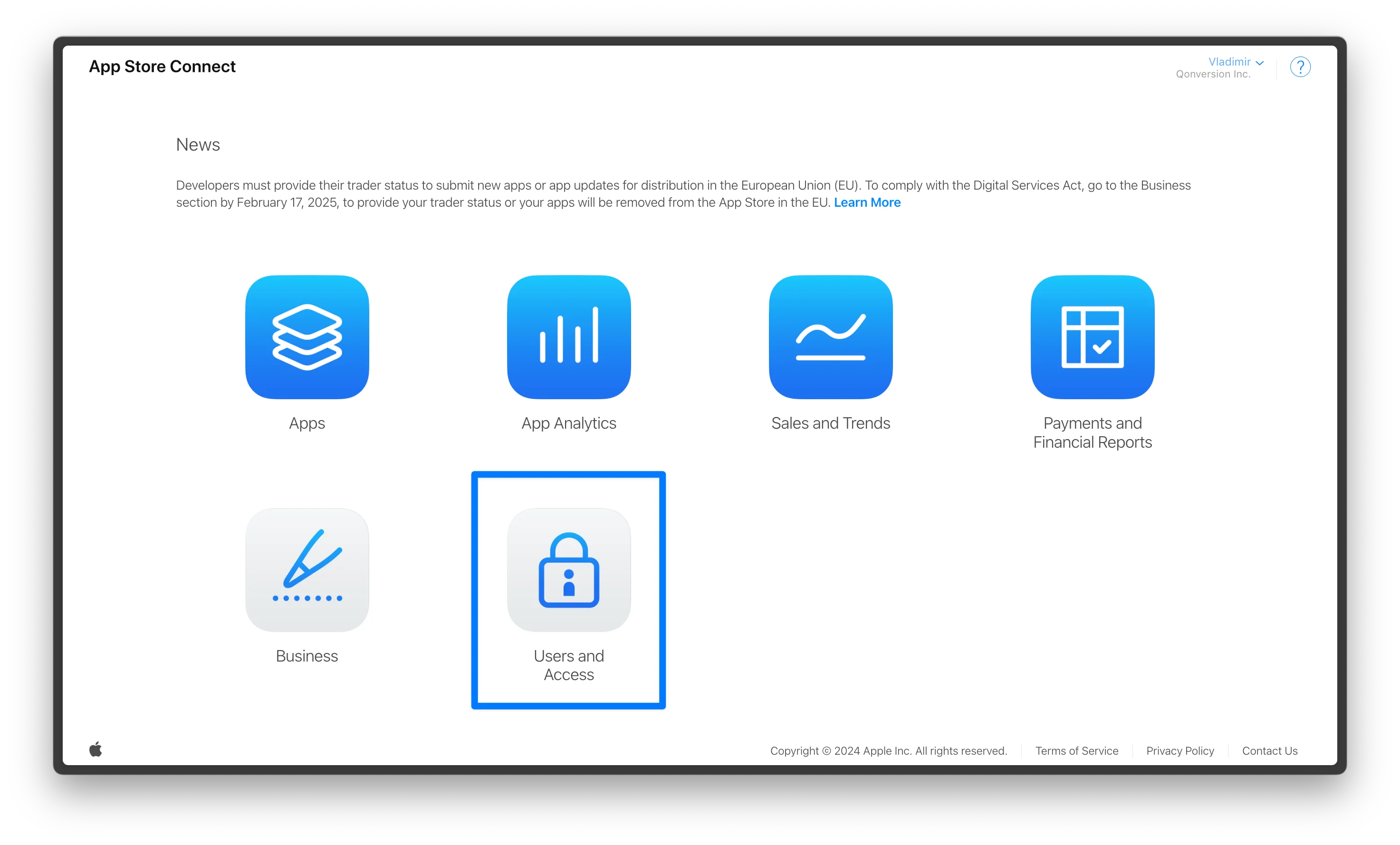
After login, switch to the appropriate developer team if necessary, and open the Users and Access section.
>
💡In case you do not see the “Users and Access” tab – make sure you have additional rights, if not – ask your Apple Developer account administrator to grant user rights before continuing.
On the Users and Access page, select the Integrations tab.
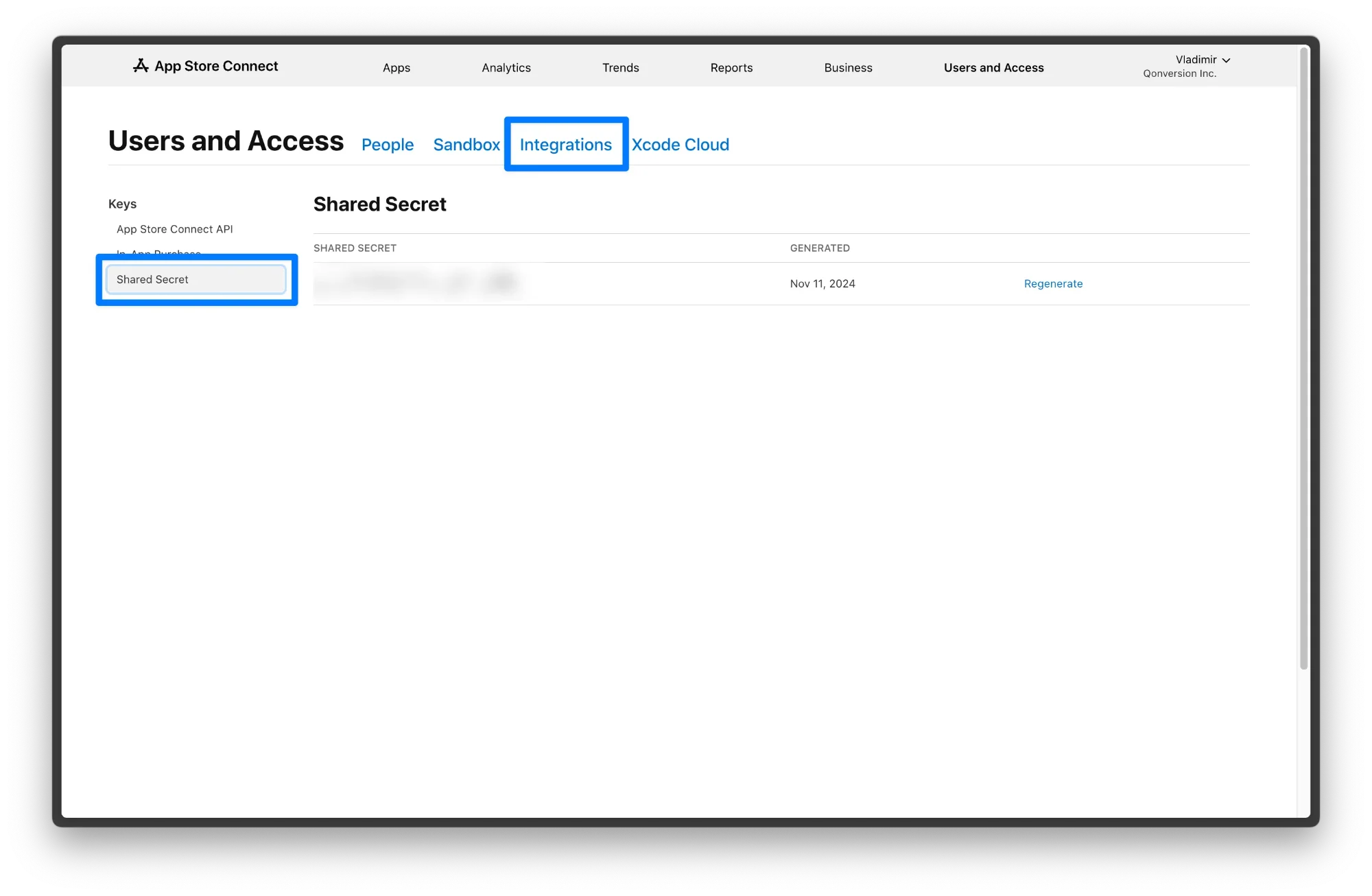
- If this is your first time, click on the generate button. After the first generation, only the regenerate button remains, so choose it.
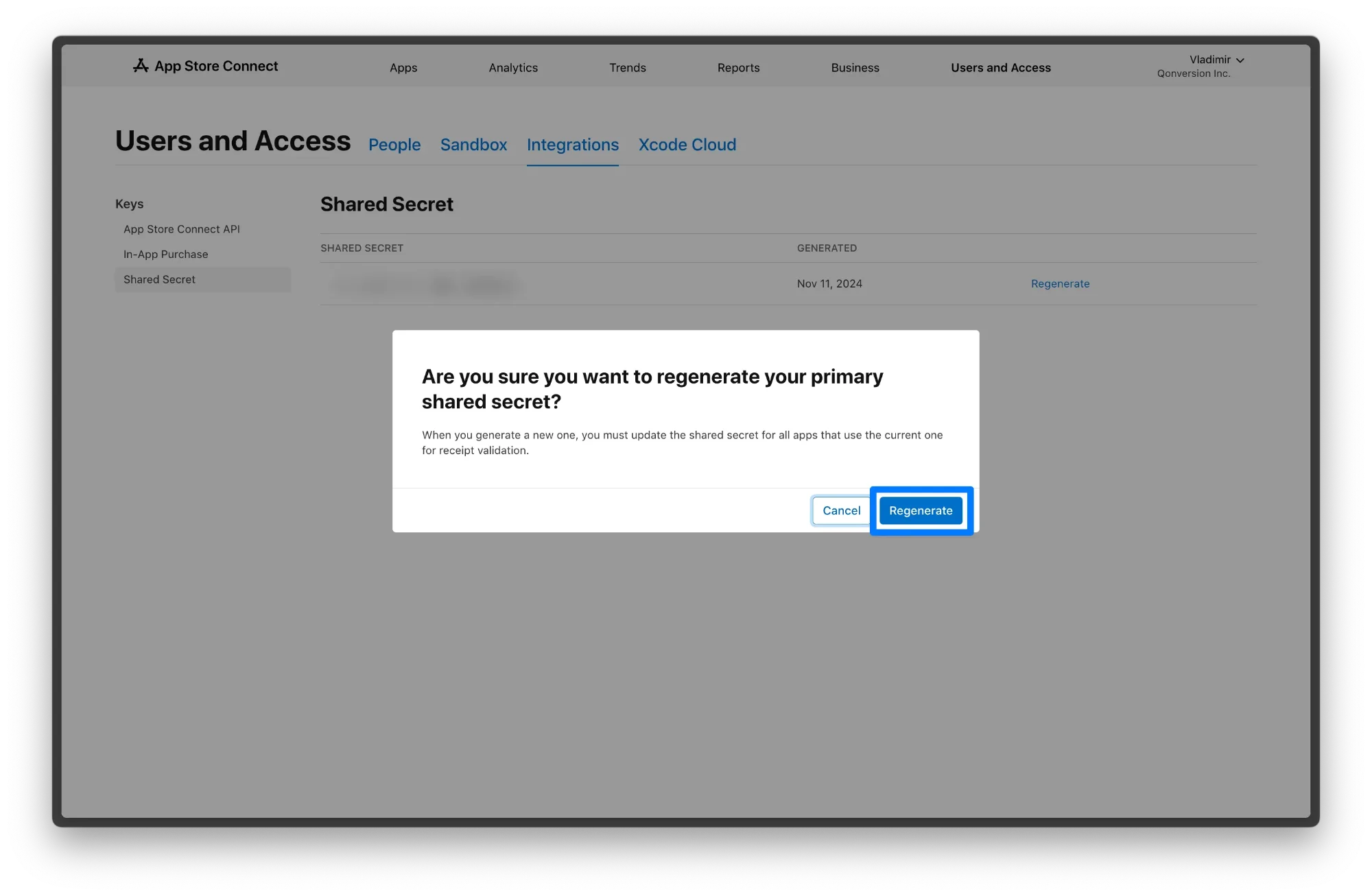
- Copy the generated secret and save it securely. You can return here later to find the secret again.
To get App-Specific Shared Secret
- Go to the App Store Connect portal and login to your Apple Developer account.
After login, switch to the appropriate developer team if necessary, and open the Apps section.
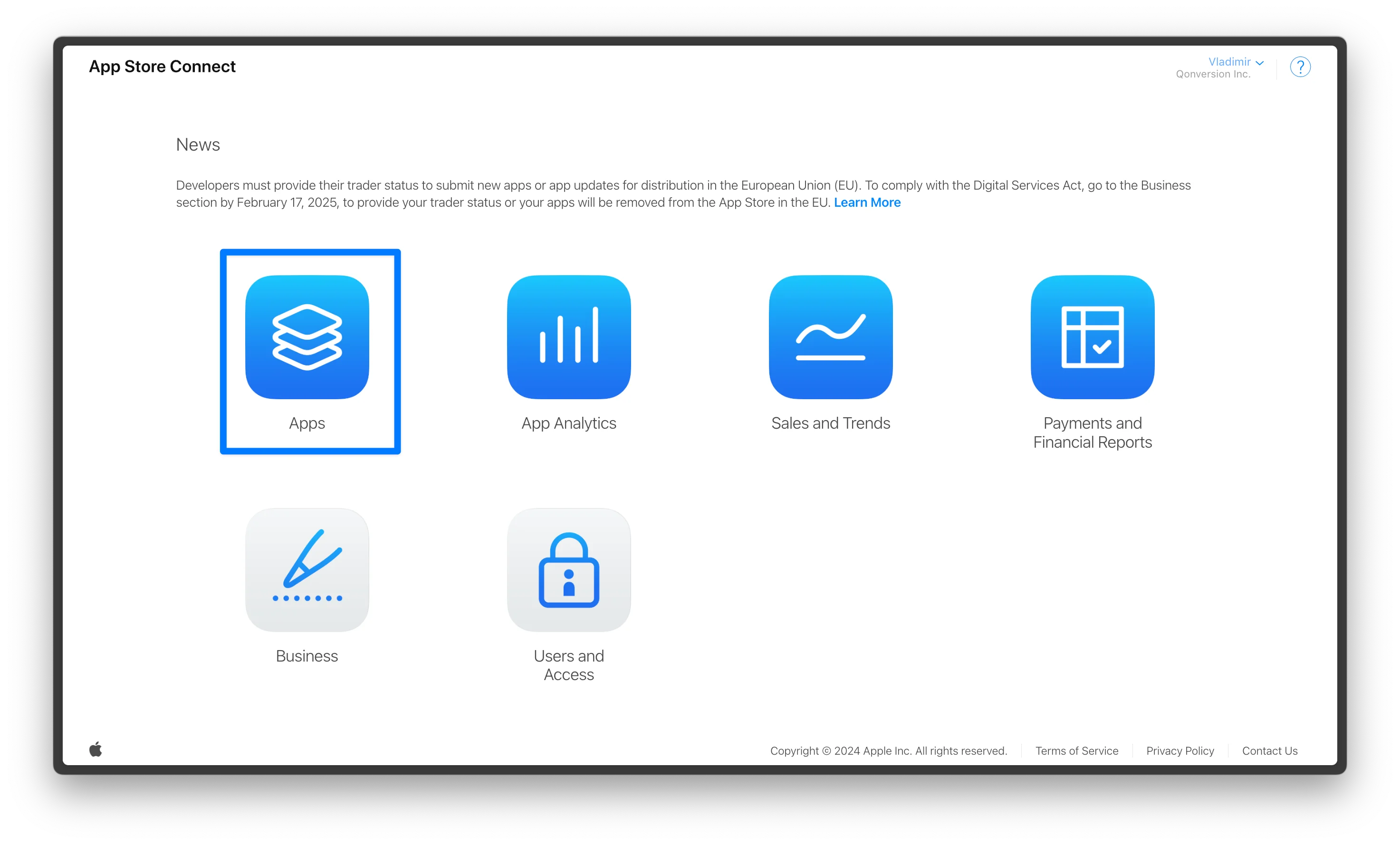
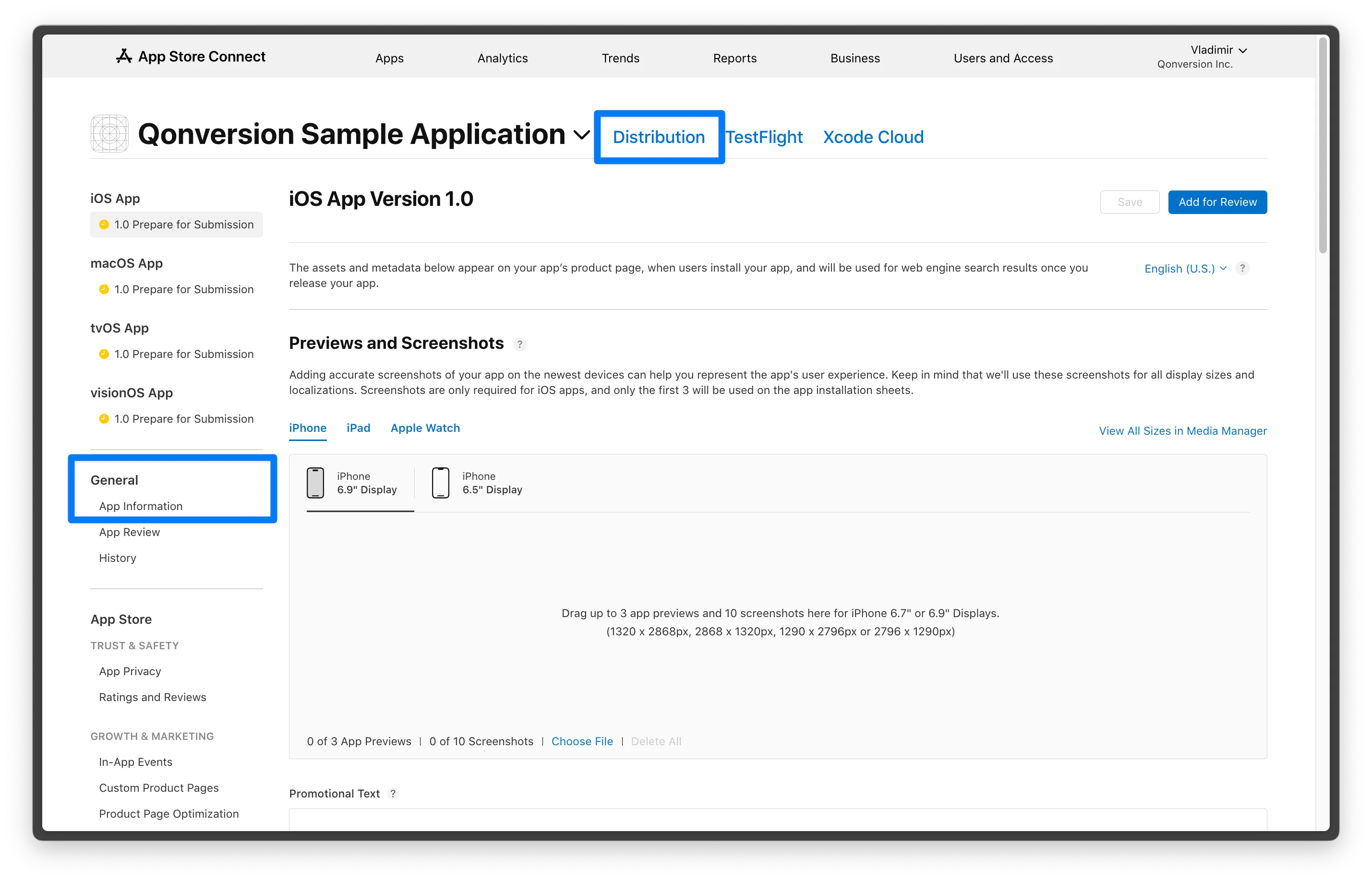
Select the app you need to process. Make sure you are on the Distribution tab.
Go to App information under the General section.
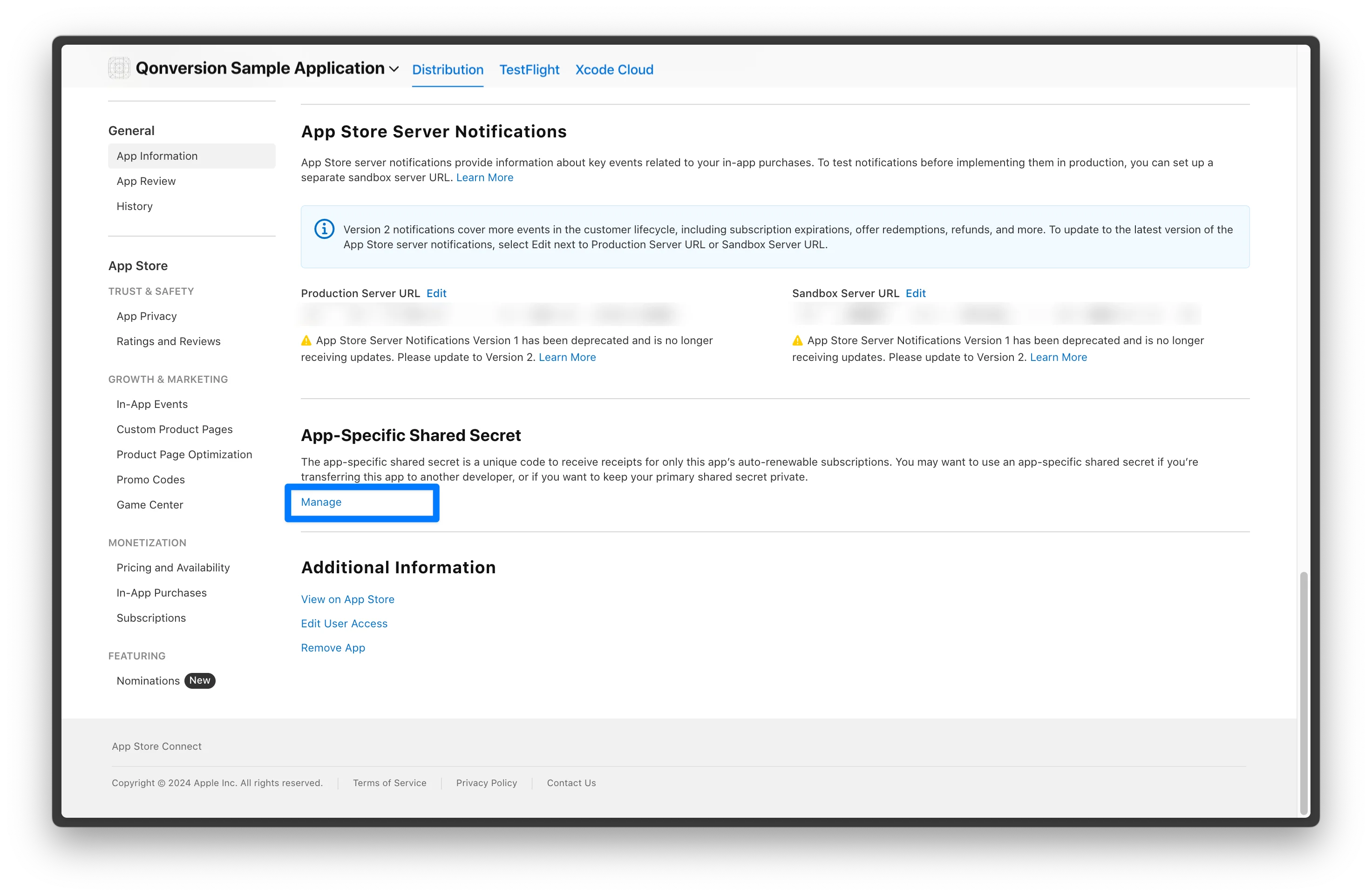
Scroll down to the “App-Specific Shared Secret” label and click the “Manage” button.
Secure Your Shared Secret
Store the App Store Connect Shared Secret in a secure location. Avoid exposing it in your app's binary or client-side code to prevent unauthorized access.
>
Make sure to save your shared secret not only in server’s environment, but also within security app. In case you lose your shared secret, you'll have to regenerate it in the Manage section.
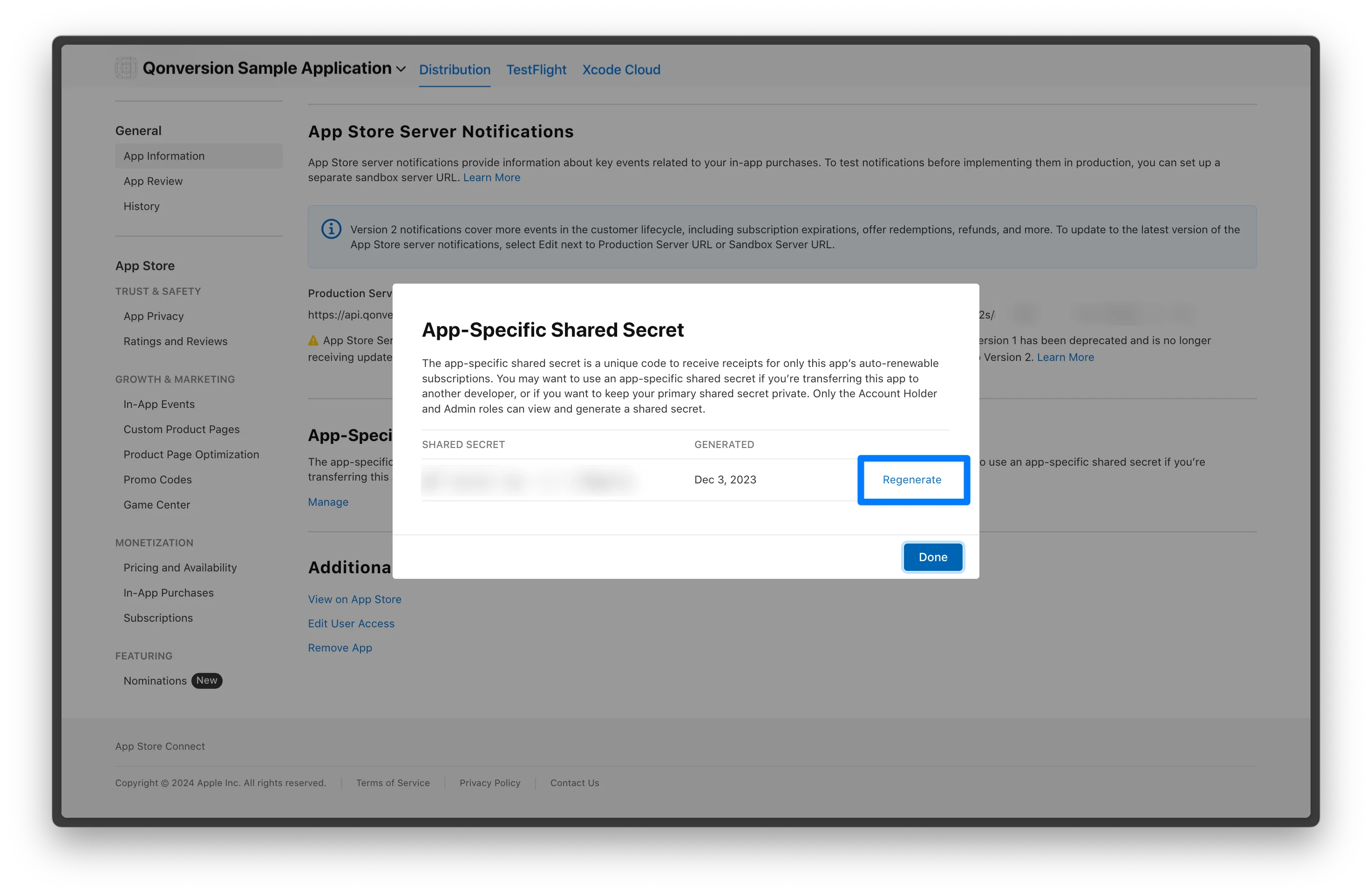
When you generate a new shared secret, any previously generated shared secret for that app will be invalidated. If your app uses the shared secret to verify receipts, you must update your server or app with the new shared secret immediately to prevent disruptions.
⚠️ Note that clicking Regenerate will automatically create a new shared secret, and any previously generated shared secret for that app will be invalidated.
App Store Connect Shared Secret's Use Cases
App Store Connect Shared Secret was mainly used to verify receipts and to integrate your app data with another platforms.
Integrate the Shared Secret with Qonversion
Qonversion is your go-to platfotm to manage in-app subscriptions, analyze your app's user behavior, and grow your revenue. By integrating your App Store Connect Shared Secret with Qonversion, you can streamline subscription validation and gain deeper insights into your users' subscription activities. What will connecting the App Store Connect Shared Secret do for your app?
- It simplifies the process by letting Qonversion handle receipt validation with Apple's servers, eliminating the need for complex server-side code on your end.
- You'll also gain immediate access to real-time analytics that provide insights into subscription metrics like renewals and cancellations, which will help you make quick, informed decisions.
Integrating your Shared Secret to Qonversion is part of your onboarding and is as easy as copy-paste.
- Sign up for Qonversion and follow the onboarding to create the first project.
- Paste your Shared Secret in the second step to connect your App Store.
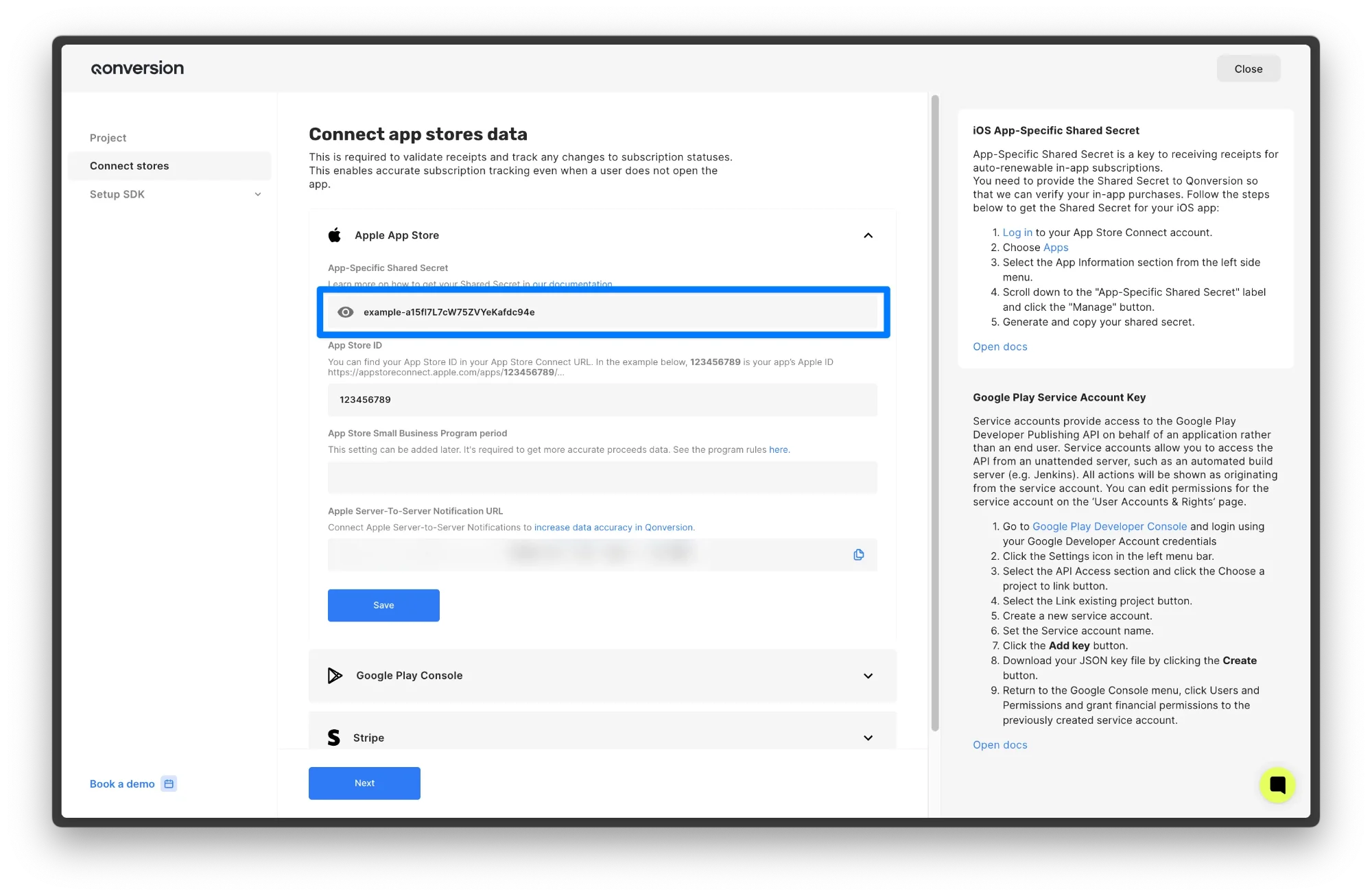
App Store Connect Shared Secret for Receipt Validation
- The user make a purchase within your app.
- The app retrieves the purchase receipt and sends it to your server.
- Your server sends the receipt data, along with the App Store Connect Shared Secret, to Apple's receipt validation endpoint.
- Upon successful validation, the server grants the user access to premium content.
When testing your receipt validation workflow, remember that Apple provides two endpoints: production and Sandbox .
>
Always call the production URL first. If you receive a 21007 status code, proceed to verify with the sandbox URL. This approach ensures you won't need to switch between URLs while your app is in testing, under review by App Review, or live in the App Store.
Receipt Validation Example
Here I'll show you the backend part of receipt validation. You may know that a receipt is a long encoded string that contains information about subscriptions. It can be about 5-10 KB for very fresh recipes and reach 20 KB or more for recipes with a rich subscription history. Once, I came across a recipe that was almost 3 MB – it was a Dandbox recipe, which contained a huge history of a test client's subscriptions. Here, for simplification, I am using a shortened version "MIIUsAYJKoZ.......D6d/fhTGQ=".
Look, the password here is our Apple Shared Secret.
curl
HTTP
Go
Example of a correctly decoded recipe response:
Receipt Validation Tool
Go ahead and cross-reference with Apple's documentation here or use an Apple Receipt Checker tool that will validate your subscriptions automatically, where there are also descriptions of possible errors.
Is the Shared Secret Legacy, and Should You Opt for Newer Approaches?
While the App Store Connect Shared Secret has been a traditional method for verifying receipts in auto-renewable subscriptions, Apple has introduced newer tools like the App Store Server API and App Store Server Notifications. These methods offer more comprehensive, secure, and automated ways to manage subscriptions. Using Shared Secret to verify receipts is deprecated. To validate receipts on your server, follow the steps in Validating receipts on the device on your server. To validate in-app purchases on your server without using receipts, call the App Store Server API to get Apple-signed transaction and subscription information for your customers, or verify the AppTransaction and Transaction signed data that your app obtains. You can also get the same signed transaction and subscription information from the App Store Server Notifications V2 endpoint.You only need to configure Shared Secret if you're on the Original StoreKit, and if you're planning to migrate (which you probably should) this guide will come in handy.
Advantages of Newer Methods
- Enhanced Security: The App Store Server API uses JSON Web Tokens (JWT) for authentication, providing a more secure method compared to the static Shared Secret. JWTs are dynamically generated and time-limited, reducing the risk of unauthorized access.
- Real-Time Notifications: App Store Server Notifications allow your server to receive instant updates about subscription events like renewals, cancellations, and refunds. This enables proactive and automated user management, improving the overall user experience.
Simplified Receipt Validation: The new APIs streamline the receipt validation process, reducing complexity in your server-side code.
FAQ on App Store Connect Shared Secret
How to Get Shared Secret in App Store Connect?
To get your Shared Secret, follow these steps:
- Log in to your Apple App Store Connect
- Navigate to your app under “My Apps” and select particular App
- Find “General” section, click on “App Information” section
- Scroll down to the “App-Specific Shared Secret” section and click Generate
Above, we've covered these steps with more details and screenshots.
How often should I rotate the Shared Secret?
It's a good practice to periodically reset your Shared Secret in App Store Connect and update your server configuration accordingly. Regular rotation, such as quarterly, enhances security by reducing the window of opportunity if the secret has been compromised without your knowledge.
How to manage App Store Connect Shared Secret with all the changes Apple brings?
It's challanging to keep up with all the updates but here's what you can do:
- Stay updated and keep abreast of Apple's latest subscription management tools and APIs – watch WWDC and follow Qonversion.
- Monitor subscription events by using Server Notifications to stay informed about renewals, cancellations, and billing issues. It’s one of the most useful methods to ensure everything goes according to plan.
- Optimize user experience and ensure that subscription status updates are reflected promptly in your app to maintain user trust.
Conclusion
Well, there you have it – everything you ever wanted (or didn't know you wanted) to know about the App Store Connect Shared Secret! We've explored what it is, how to get it, and the pros and cons of different types. We've dipped our toes into the StoreKit Configuration Files and intoduced Apple's newer subscription management tools.
Remember, managing subscriptions doesn't have to be a headache. By understanding the Shared Secret and following best practices, you can keep your app secure and your users happy. Use our hub to ask question or suggest feature, and if you need help, contact us right away!

Vladimir
Operations Lead at Qonversion
Vladimir ensures smooth operations at Qonversion, supporting the team and customers.