Mobile apps are fascinating. Imagine, a small team (or even a single indie developer) can build an app, instantly distribute it globally through the App Stores, and reach billions of users across the world.
Introduction
Mobile apps are fascinating. Imagine a small team (or even a single indie developer) can build an app, instantly distribute it globally through the App Stores, and reach billions of users worldwide.
Founders of successful apps build fortunes. For example, there were only six developers on Instagram when Facebook acquired it for $1B. And there were just 32 engineers at WhatsApp when Facebook acquired it for $19B… Consumers spent $120B on mobile apps in 2019, per App Annie report. That vast market keeps growing, and it is a massive opportunity for you!
It might be hard to break through the noise of the thousands of apps competing in the App Stores, but it’s still possible, especially using the right tools. If you set these tools up correctly when launching, time and you will save t money and learn significantly faster.
For this article, we zoomed in with Artem Kubatkin, the head of growth at Enki, an award-winning learn-to-code platform from Los Angeles featured globally in both Apple and Google app stores. Together, we prepared eight tips to help you set up mobile analytics for your app and power its growth.
Eight tips on how to set up your mobile analytics
Start with product analytics.
The gold standards for mobile product analytics are Amplitude, Mixpanel, and Google’s Firebase. Firebase Google Analytics is virtually free, integrates with Google Ads, and can be used for push notifications (we’ll get into that later). It’s one of the most popular SDKs globally, so it’s an excellent start for installing immediately.
We also recommend installing Amplitude or Mixpanel for deeper product analytics, as both have good free plans. Notably, if your app becomes somewhat successful, you will likely hit the limit on their free plans (a million events per month in Amplitude or 1000 tracked users in Mixpanel). Hint: you can apply for Amplitude’s or Mixpanel’s startup program, which will likely grant you a free 1-year account with a much higher data limit. Both platforms will require you to implement the SDK.
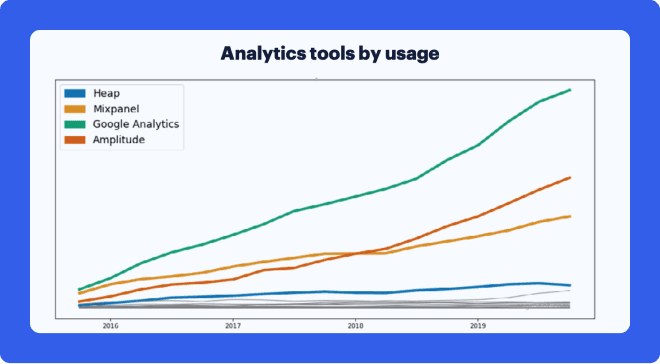
Here is the chart we found regarding product analytics popularity based on Segment’s data (Segment is another data platform worth checking out. The data on the chart represents platforms that are not solely for mobile analytic platforms. You can find the full report here)
Install Advertising SDKs
The three top-performing user acquisition channels for non-gaming mobile apps are Google, Facebook, and Apple Search Ads, according to AppsFlyer’s Index based on the second half of 2019 data.
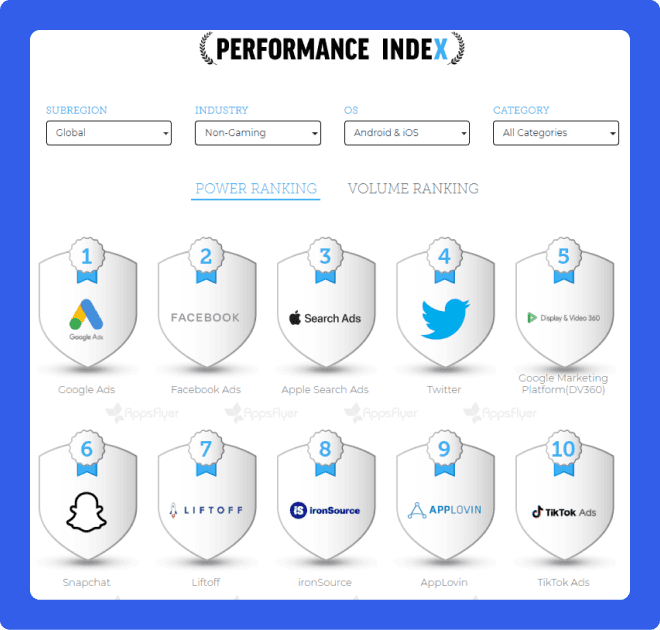
Unless you believe your app will go viral, and let’s be honest, that’s a naive assumption these days, you do want to try at least these three platforms to acquire users.
As such, you’ll have to integrate Facebook SDK and Firebase SDK for Google App Campaigns. Facebook will automatically provide you with Facebook Analytics that can be used for both your product and marketing goals. It’s free and reasonably convenient as well.Apple Search Ads is available for any iOS app by default. Depending on your app's target audience, you might also try user acquisition sources like Snapchat, TikTok, Twitter, or other platforms.
Set Up Attribution platforms
To understand your marketing performance, you need to match your user revenue and the cost of acquiring them to an advertising campaign level. If you are starting with just one acquisition channel, like Facebook Ads, you can use the data provided within. However, as soon as you acquire customers from several channels, you will need an attribution platform.
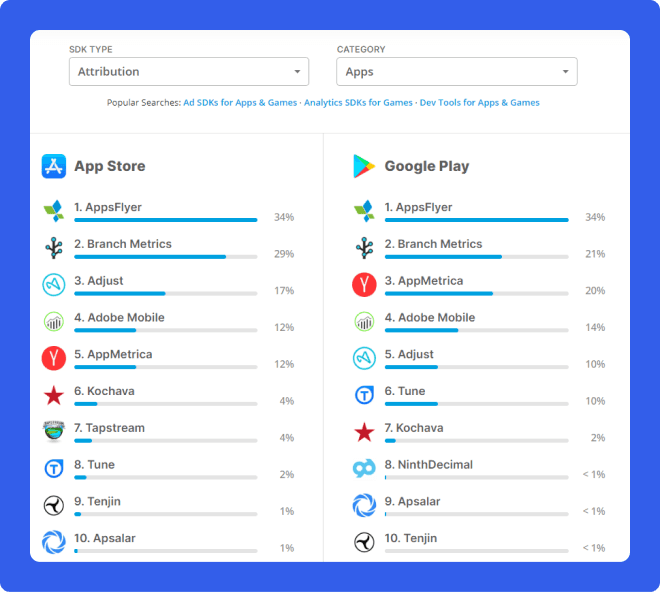
There are three leaders in attribution: AppsFlyer, Adjust, and Branch. AppsFlyer is the most popular one, but it could be quite expensive, with a price per install of 5-6 cents. Alternative options include Kochava, Singular, or Tenjin.
You’ll have to install SDK for the attribution platform as well. Here is the data on attribution SDK popularity from AppFigures, including other players, for you to consider:
Don’t forget about communication and retention SDKs
You need to communicate with your users, engage them, and retain them even when they are not using the app. The standard ways to do so are push notifications and emails. Instead of wasting your time programming this communication infrastructure yourself, you can use well-established and inexpensive tools.
“The solutions we like the most are OneSignal or Google’s Firebase for push notifications and Sendgrid ormails, MailChimp for e” – says Artem from Enki. And yes, you need to integrate the SDKs to make them work, but it’s much faster than trying to reinvent the wheel with your own push notifications and email backend.
Track and measure your subscriptions
Suppose you use in-app subscriptions for monetization as most non-gaming apps do now. In that case, you’ll also have to handle server-side receipt validation and gather accurate subscription data like trial-to-paid-subscriber conversion, trial cancellation, subscription cancellation, and renewal. The trick is to send this data to all the platforms mentioned above to obtain accurate data for product and marketing decisions.
“We use Qonversion to get better insights into the subscription data for our Enki app. Saves time,” says Artem.
Qonversion allows users to integrate subscriptions easily and process all subscription-related data—no need to struggle with Apple’s StoreKit. Qonversion also provides subscription analytics and monitoring tools; you get out-of-the-box integrations with all the abovementioned platforms. That’s what makes it an essential SDK to add.
Manage your user profiles.
So far, the SDK count is at least 7:
– 1 product analytics
– 2 marketing platforms
– 1 attribution platform
– 2 communication platforms
– 1 subscription analytics
Each of the platforms used will have its user ID. Plus, you must set up your user ID in your database. Creating a user profile, including user ID and email, is a good idea whenever possible. They will come in handy for identifying and managing cross-platform user access. You’ll also be able to use email for promotional offers and re-engage your churned customers.
Document your analytics events
While adding all these tools, you should create documentation for your analytics. This will help you set up everything correctly, debug potential issues, and share the setup with your team. Choose whatever system you like for this; even Google Docs would work to start with.
Each app screen and button should trigger an event with a unique name so you can quickly check how users navigate your app, build funnels, and detect user behavior patterns. Could you write the event names in your internal documentation?
Most apps use some degree of onboarding to provide a personalized user experience. Say you run a fitness app—you want to know your user's age, gender, weight, fitness level, training preferences, and so on. Make sure to create an event in analytics for each step of your onboarding process to better understand who your users are and what they prefer. If you are offering a trial or subscription during the onboarding, make sure to collect all the data related to it.
Run a marketing test and look for discrepancies.
Before spending significant money on marketing, you must run small tests and acquire a few users from Facebook, Google, and Search Ads. You then need to check the number of free trials and subscriptions, for example, the match between Facebook Analytics, App Store Analytics, AppsFlyer, and your product analytics.
Remember, it’s important to check data consistency across all platforms. If there is a significant discrepancy, you need to find the reasons and fix them as soon as possible.
Some common data discrepancies we’ve seen in practice are:
1) events triggered twice or more in any of the platforms due to incorrect SDK setup
2) user ID setup is incorrect or inconsistent
3) test events mixed with production events
4) event properties like event value supported in one system but not in the other
Each platform can have its data issues. For example, you can check the reasons behind AppsFlyer data inconsistencies here. Chances are you won’t be able to have the exact match across all platforms, but in general, you want to see a difference of not more than several percent.
Closing
Using the right tools will maximize your chance of breaking through the noise of thousands of apps in the App Stores. Setting everything up will take time, but trust us, it’s well worth it.
Good luck with your mobile app, and a salute to your future growth!
Take Action!
Qonversion provides complete in-app purchases infrastructure, so you do not need to build your server for receipt validation. Use Qonversion to implement in-app subscriptions, validate user receipts, check subscription status, and provide access to your app features and content using our StoreKit and Google Play Billing wrapper. Sign up now to get started.By combining remote experts with efficient software, Enki can empower any non-technical employee or team with mastery of data skills in four weeks with no time off work. Check them out here.

Michael
CEO at Qonversion
Michael leads Qonversion with a vision to help mobile apps maximize their subscription revenue.