If you are building an app with subscriptions (aka IAP), you probably know how hard it is to get the in-app subscription data gathered correctly and right where you need it.
It’s impossible to accurately track subscription events like renewals, conversions from free trials, refunds, and others on a device since most of these events happen on Apple or Google servers. A device simply does not have the data half of the time, since the app is not running while subscriptions change from one state to another on App Store or on Google Play.
So first, you need to build a backend to parse the subscription data directly from Apple or Google. And second, you need to send the data to the destinations like AppsFlyer or other attribution platforms, where you can measure your marketing performance.
Sending the Subscription Data to AppsFlyer from Your Server
AppsFlyer provides the API to send events from your server to the AppsFlyer’s endpoint. If done right, these events are attributed to the existing installs in AppsFlyer. That is how you can get accurate subscription revenue for a cohort of users in AppsFlyer, including subscription renewals and refunds.
But as the picture below implies, there are a number of technicalities to tackle while sending the events to AppsFlyer.
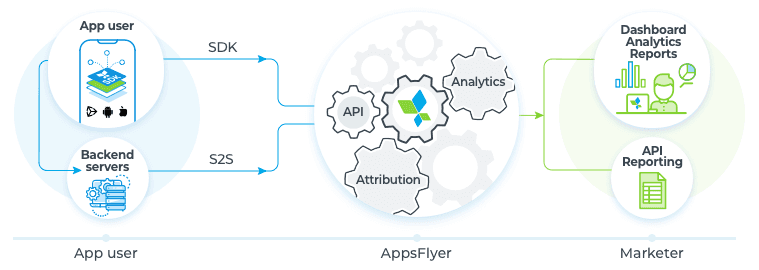
It’s essential to send device identifiers in your payload: Device identifiers might be as follows:
- IDFA (iOS) – The Identifier for Advertisers is a unique device identifier assigned by Apple. Though it’s very handy for user tracking, the problem with IDFA is that it has became less useful since iOS14 as Apple strives to improve user privacy. Here's more about iOS 14 IDFA overview.
- IDFV (iOS, identifierForVendor) – An alphanumeric code that uniquely identifies a device to the app’s vendor. In other words, IDFV is assigned to the apps from the same developer on your device. The value of the IDFV is identical for apps from the same developer running on the same device.
- advertiser_id (Android) – a unique ID set by Google Play to provide developers with simple user tracking.
You also must send appsflyer_id – a unique id generated by AppsFlyer at the first launch on a device. So yes, it means your backend needs to gather AppFlyer’s customer user IDs, and you need to attribute subscription events to these IDs, if you want to send the events to AppsFlyer later on. There are several ways of getting AppsFlyer customer user ID (CUID). The easiest way is to get it from AppsFlyer SDK in your app. You can check the details and other available options here.
Other mandatory parameters you must provide in your post request to the AppsFlyer server are:
eventName – this should correspond to your needs when analyzing the data in AppsFlyer. For example, “af_renewal” for renewals.eventValue – that’s where you transmit revenue values for your subscriptions.
A closer look at the eventValue parameter
If you do not want the event to affect your revenue measurements in AppsFlyer (for example, events with no actual revenue like trial start or entering billing retry state), you need to send the empty value: "eventValue":""
- If the value is not an integer (for example, $9,99/month subscription), a decimal comma should be used.
- If the value is negative (i.e. refund), it should be preceded by a -.
Below are two examples from AppsFlyer documentation for eventValue. Note that the second example specifies if the event is renewal:
Other parameters are not mandatory, but you’ll be better off sending the set of data as complete as possible.
A note on the eventTime parameter. You can send out the time when an event happened. But it needs to be delivered to AppsFlyer before 02:00 AM (UTC) of the following day. Otherwise, AppsFlyer will ignore the value you sent and set the time of the actual event’s arrival to its servers.
Wrapping your data in JSON and sending POST request to Appsflyer
When your data is ready, you need to wrap it in JSON again. Thus eventValue will be wrapped twice.Besides the correct data payload, you need to establish the correct HTTPS connection with the AppsFlyer server. First, build the URL with your APP_ID appending it to the base endpoint URL: https://api2.appsflyer.com/inappevent/.Then tune some headers: set Content-Type to application/json and put your API_KEY to non-standard authentication header. Now you are ready to POST your data!Here is the full example of the POST request to AppsFlyer API:
After the data is sent you need to check the result. There are three types of responses:
OK responseError response-
No response.
While OK is what you want, other results will occur sometimes and you have to react accordingly. There is a number of different response codes, and some response codes correspond to multiple error messages. You can check the response codes including possible error messages here.
Some responses should be treated as fatal errors, i.e. AppsFlyer is not accepting the request. While others are non-fatal and should be scheduled for resending if you want your data to be complete. But if you assume that some event was not received by AppsFlyer and resend it, while it was actually received the first time, you are duplicating events. So the process of sending accurate and complete data without duplicates might be tricky.
An Easier Way to Validate User Receipts and Share In-app Subscription Events
The described solution shows that the process of sending subscription data to Appsflyer is a tedious one, and there are a lot of obstacles to tackle. So it’s the perfect time for a bit of self-promotion. It may be a good idea to use third-party service for a task like this. Qonversion provides the backend that validates in-app purchases with App Stores and provides simple out-of-the-box integration with AppsFlyer and many other platforms.
More Resources
Because we offer Appsflyer Integration, here are useful resources on the topic:
- Complete documentation for AppsFlyer S2S API
- An article on Appsflyer Pricing and In-App Events Tracking
- A guide on How to leverage AppsFlyer and SKAdNetwork for attribution on iOS on 14.5 and above
Drop up a line in the support chat or hit us up in the community in case of any questions or issues in tracking your revenue.

Michael
CEO at Qonversion
Michael leads Qonversion with a vision to help mobile apps maximize their subscription revenue.