The ultimate goal of any managed mobile app is to bring in new users to convert and keep happy. If each step of this marketing funnel is followed, you’ll observe a positive impact on your bottom line and the growth of your business.
However, everything stems from the ability to draw in new customers. For that, most mobile app developers and marketers rely on advertising, especially through Apple Search Ads. Luckily, with iOS 15 Apple introduced custom product pages for even better user acquisition.
Today, we’re going to do a deep dive on App Store’s custom product pages, how they can be configured, measured, and used to boost marketing efforts. By the end of the post, you’ll hopefully be able to start leveraging this new feature. Let’s get started.
What is Custom Product Page Testing?
Let’s start with the basics: custom product page testing allows app developers and marketers to create multiple versions of their App Store product pages—up to 35, to be exact. Each page can feature unique screenshots, videos, and promotional text, giving you more control over how your app is presented to different audience segments. These custom pages come with distinct URLs, making them perfect for targeted campaigns and seamless integration with Apple Search Ads.
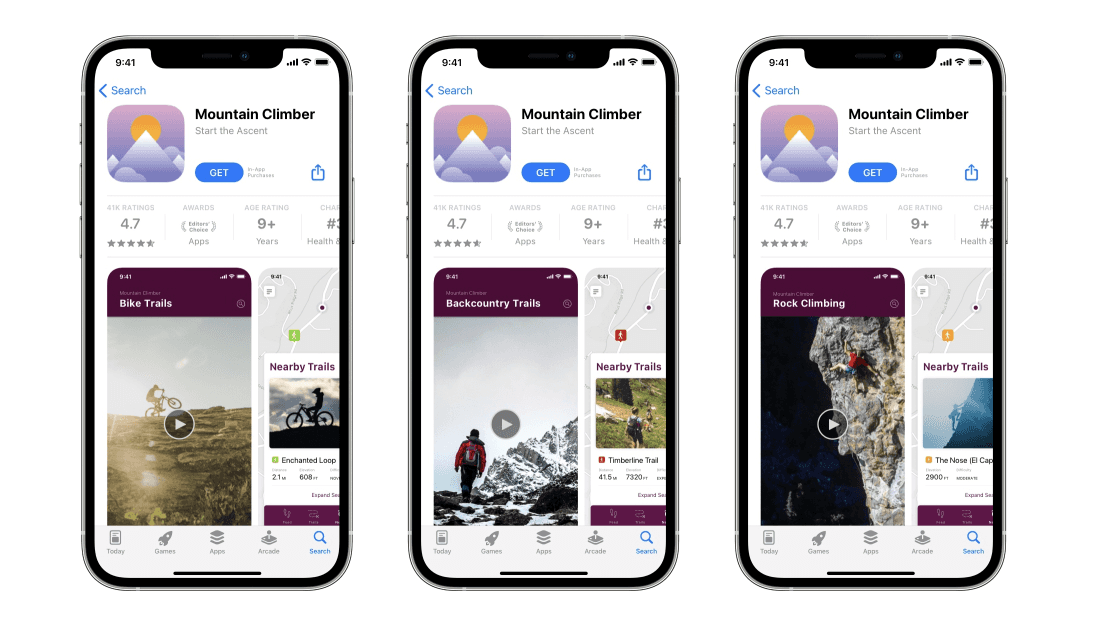
Think of custom product pages as mini landing pages designed to boost conversion rates. They let you highlight specific app features and tailor content to match what different user groups care about most. Whether you’re running campaigns for iPhone or Android users, product page optimization becomes much easier when you use custom product page testing software to experiment and analyze which variations perform best.
With custom product page testing on the App Store, you can monitor the performance of each page through App Store Analytics. This data helps you fine-tune your strategy by comparing page performance and adjusting visuals or messaging for optimal results. Ultimately, custom product page testing not only improves the user experience but also drives installs, boosts conversions, and enhances your product page optimization efforts across both iOS and Android platforms.
Custom Product Page Testing for Mobile App Marketing
With custom product page testing, each page gets a unique URL, allowing you to align your marketing campaigns with specific audience segments or campaign goals. By creating separate pages for each group, you can boost product page optimization and drive more downloads through highly targeted content. Below are some key strategies to make the most of this tool.
Custom Product Pages for Each Customer Segment
User segmentation is essential for long-term growth. Every user interacts with your app differently, so tailoring your product page content ensures better engagement. By using custom product page testing software, you can create unique pages for distinct customer segments. For example, a food delivery app might develop customized pages with location-based messaging, making the content more relevant for users in specific cities or regions.
Create Custom Product Pages for Specific Keywords
Another effective strategy involves targeting keywords. Since custom product pages integrate seamlessly with Apple Search Ads, you can create pages aligned with different keyword themes. This allows you to optimize for search intent and boost conversions with relevant visuals and text. For instance, if you’re targeting users searching for fitness solutions, your product page can focus on specific features such as “weight loss” or “muscle gain,” ensuring users land on the most relevant version of your product page.
Highlight App Features with Custom Product Pages
You can also use custom product page testing to spotlight specific features. This is particularly useful when running feature-based campaigns. If analytics show that users are primarily interested in distinct capabilities—such as tracking workouts versus creating meal plans—creating multiple pages highlighting each feature will enhance your chances of generating downloads. For example, if you offer a fitness solution, and thanks to extensive analytics, you know that some customers look for weight loss programs while others for muscle building. In this case, presenting custom product pages examples that appeal to users based on their individual preferences increases your chances of generating a download.
Incorporating Custom Product Pages into Marketing Campaigns
Leveraging custom product pages within Apple Search Ads is just the beginning. These pages also work well with content marketing, email campaigns, and Facebook Ads. Each campaign can link to a specific page, helping improve messaging consistency and product page optimization app store performance. However, since Apple doesn’t index custom pages, their impact is indirect, driving installs and influencing conversion rates rather than search visibility.
Tracking Performance with Analytics
After Apple reviews and approves your custom product pages, you can monitor their performance through App Store Analytics. By comparing the metrics of each custom page with the default product page, you’ll gain insights into which strategies are working best. A/B testing plays a crucial role here—enabling you to refine your pages by adjusting visuals, text, or promotions. This continuous optimization ensures you achieve better conversion rates, whether your focus is on custom product page testing iPhone or custom product page testing Android apps.
With these strategies in place, you can maximize the potential of custom product page testing app store campaigns, ensuring that your app stands out and attracts the right users.
Step-by-Step Guide to Configure Custom Product Pages
Now that we’ve discussed the value of custom product pages to improve your marketing efforts, it’s time to get practical and figure out what steps actually needed to set up your CPP. Let’s take a look.
Select your app
The very first thing you must do is select the app for which you’d like to make your custom product pages from the “My Apps” section of App Store Connect. Don’t forget that for each application you run, you’ll be able to publish up to 35 CPP variations.
Create a Custom Product Page
Then, in the left sidebar, under the features section, click “Custom Product Pages” and create a new one. At this point, consider entering a name for your CPP that will help distinguish it in your App Analytics. Perhaps, name it after a campaign you’re running or a customer segment that it focuses on.
Choose a Blank Page or Edit an Existing One
Next, pick whether you’re going to start with an empty page or make changes to an existing one. If you choose the latter, look for the correct version in the “Ready for Sale” state or the “Prepare for Submission” state. Finally, click “Create” and your CPP with a unique URL will be automatically generated.
Modify Creative Elements
Now, it’s time for the fun part — modifying your creative assets. At this point, you can add or replace screenshots, update app reviews, edit promotional text, and basically create the CPP version you need. Don’t be afraid to play around with this, it might take a few tries before it looks exactly how you want it to.
Submit a Custom Product Page for Review
Once you’ve modified all the creative elements, submit your custom product page for review. You can also just save the CPP and come back to it later, without submitting, if you want to keep working on it.
However, if you’re ready to proceed, simply press the “Add for Review” button at the top right-hand corner of the window where you did the editing. Then, a submission confirmation screen will appear and indicate the app version that will be associated with the custom product page you’ve created.
Edit When Needed
After your custom product page has been approved, you can always go back to it, make the edits you desire, and resubmit it for review without affecting the unique URL that was originally generated. In this case, any changes you make will be published automatically once the page is approved.
Add Custom Product Pages to Ad Variations
Here’s how you can make ad variations to better align your creative assets with the keyword themes of customer audiences you’re targeting:
- From your ASA “Ad Groups” dashboard, select an ad group that you’d like to modify.
- Click the “Create Ad” button and name your new custom advertisement.
- Pick the custom product page that determines your ad creative. This is the one users will be directed to when clicking on your ad.
- Preview the custom ad and save your settings.
Keep in mind that each ad group can only have one custom ad active. So, if you already have another one running, you’ll need to decide if you’d like your new ad to be activated and the old one paused.
How to Analyze the Performance of Custom Product Pages
Once your custom product pages are live, the next step is to evaluate their impact. Are they driving downloads effectively, or do visitors leave without taking action? Performance tracking is essential for product page optimization. Let’s explore how to do this through App Analytics and beyond.
1. Track Performance via App Analytics
A reliable way to assess performance is through App Store Connect. Under the “Acquisition” tab, you’ll find essential metrics such as impressions, downloads, re-downloads, conversion rates, and proceeds per paying user. For iOS users, comparing the performance of your custom product pages with the default product page provides deeper insights.
Look for trends that indicate success: Are users acquired via custom product pages for iPhone more engaged? Do they make higher-value purchases? These insights can help you refine your custom product page testing software strategies and boost app retention.
2. Use A/B Testing to Optimize Performance
If your app is available on Android, Google Play’s Custom Store Listings allow for cross-platform comparison, helping you analyze how the same product page performs on both iPhone and Android. This also facilitates A/B testing, where you can pit two versions of a page against each other to see which creative assets lead to more installs.
Incorporating product page optimization app store strategies, such as changing ad copy or visuals, can directly impact conversion rates. For Apple Search Ads, matching ad creatives with relevant custom product pages examples ensures that users see content tailored to their intent, which maximizes the chance of conversion.
3. Monitor KPIs Beyond Installs
While conversion rates are a crucial metric, go beyond downloads to evaluate success. Analyze retention data and in-app purchases associated with each CPP. Identify which pages lead to higher proceeds per paying user and which content resonates with specific user segments. These metrics allow for ongoing optimization of your custom product pages Apple Search Ads campaigns.
How to Measure Custom Product Pages for Subscription Apps
While App Analytics provides some insights into your custom product page performance, it often falls short in offering deeper metrics needed to evaluate the performance of subscription-based apps. Although it presents high-level data, it doesn’t fully capture the effectiveness of your marketing campaigns. This is where Qonversion steps in to enhance your analysis.
First of all, our platform offers the opportunity to stay on top of imperative subscription metrics like conversion rates, retention, churn, revenue, and many more. However, that’s just the beginning. You see, our Apple Search Ads Attribution tool is also able to automatically collect attribution data for ASA campaigns. Typically, with this information, mobile app marketers are able to analyze and attribute application installs to particular ASA campaigns. In turn, perfecting their analytics and helping to identify marketing channels worth investing into.
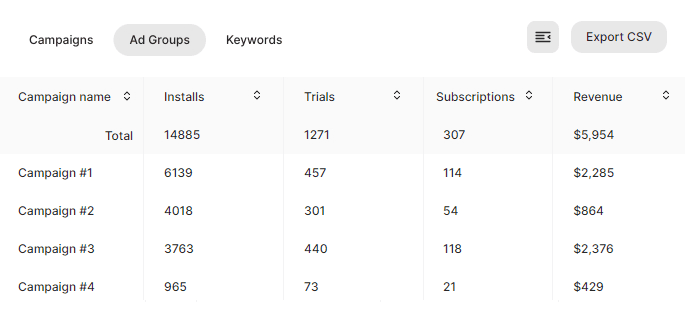
Moreover, Qonversion facilitates insights into the performance of your custom product pages by allowing you to create separate ad groups with identical parameters but varied CPP versions. This setup essentially enables you to conduct A/B tests, helping you identify which custom page resonates better with your audience. If a specific ad group linked to a unique CPP generates more installs, trials, and revenue, it might be wise to concentrate your efforts there for greater impact.
Boost Your Mobile App Marketing Campaigns
As we have seen today, Apple’s custom product pages are an exciting new feature for mobile app marketers and developers to leverage for lasting business growth. There’s a variety of tactics you can rely on to make the most of your product pages and it might be a good idea to try them all. That way, you’ll identify which ones work best for you.
At Qonversion, we understand that app developers and marketers are busy. There’s so much that goes into sustaining a well-performing business. For that reason, we’ve developed an array of tools that are bound to help you on your journey. From analytics and ASA attribution capabilities to an entire in-app subscription infrastructure and A/B Testing — there are multiple ways we can help boost your mobile app’s growth. So, don’t hesitate to reach out to our team. We’re always happy to discuss a potential collaboration.

Hena
Copywriter at Qonversion
Hena crafts compelling content about mobile app monetization and subscription optimization.