In this post, we will talk about handling payment errors and using Billing Retry with in-app subscriptions. Based on the data from Qonversion, we can see that on average 20% of payments move to Billing Issue state. Around 15% of them return to active subscription status. Enabling Apple’s Grace Period allows you to improve your customers’ experience and increase the percent of payments returned to the active subscription status.
Some common questions:
- How does Billing Retry work?
- What is the Grace Period?
- Best ways to implement the Grace Period in your product
How does Billing Retry Work?
Payment issues are among the most common reasons for losing subscribers. Let’s have a look at the following example:
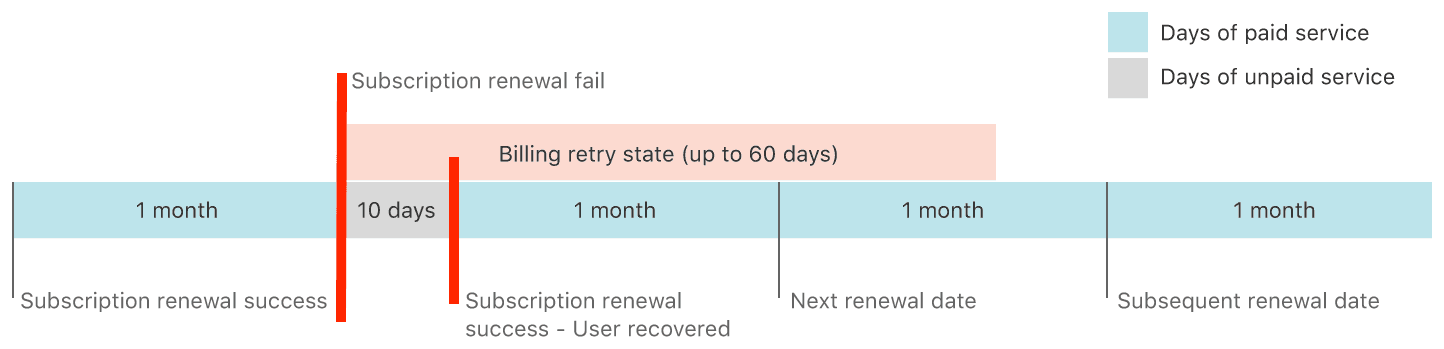
At the end of a subscription period, Apple tries to charge a client’s card. If an error occurs during this process, the subscriber’s status changes to the Billing Retry state. He can stay within this state for up to 60 days. Apple will try to renew the subscription on the upcoming renewal date while the client is in the Billing Retry status. All this time, the clients cannot use add-ons (premium) they purchased (subscribed for) in the app. The chart above shows that after ten days when a successful payment was made, the recurring payments resume. This complicates subscription analytics and LTV estimates and leads to lower customer satisfaction.
The user receipt contains the following fields:
and
The fields tell us that there was an unsuccessful attempt to receive payment.
What is the Grace Period?
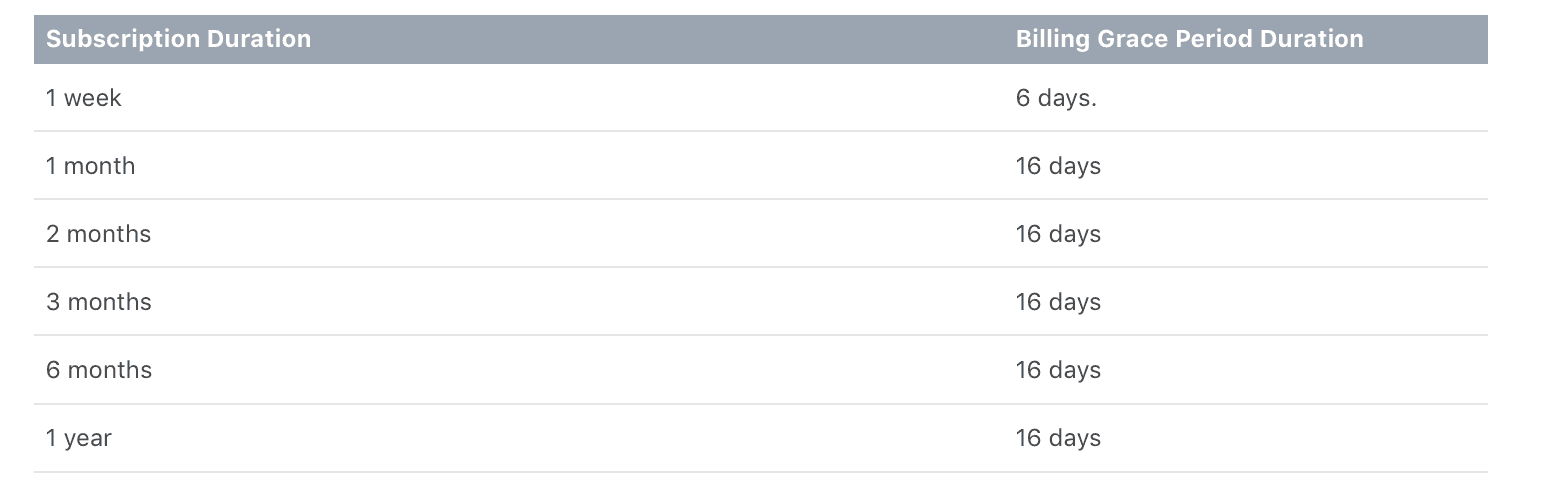
You can allow access to your app’s premium content even if Apple cannot collect payment from a client. That is precisely what the Grace Period was designed for. While Apple is trying to collect a payment, the client is granted full access to the app. The Grace Period can be activated for auto-renewable subscriptions. The length of the grace period depends on the duration of your subscription:
Let’s have a look at two examples:
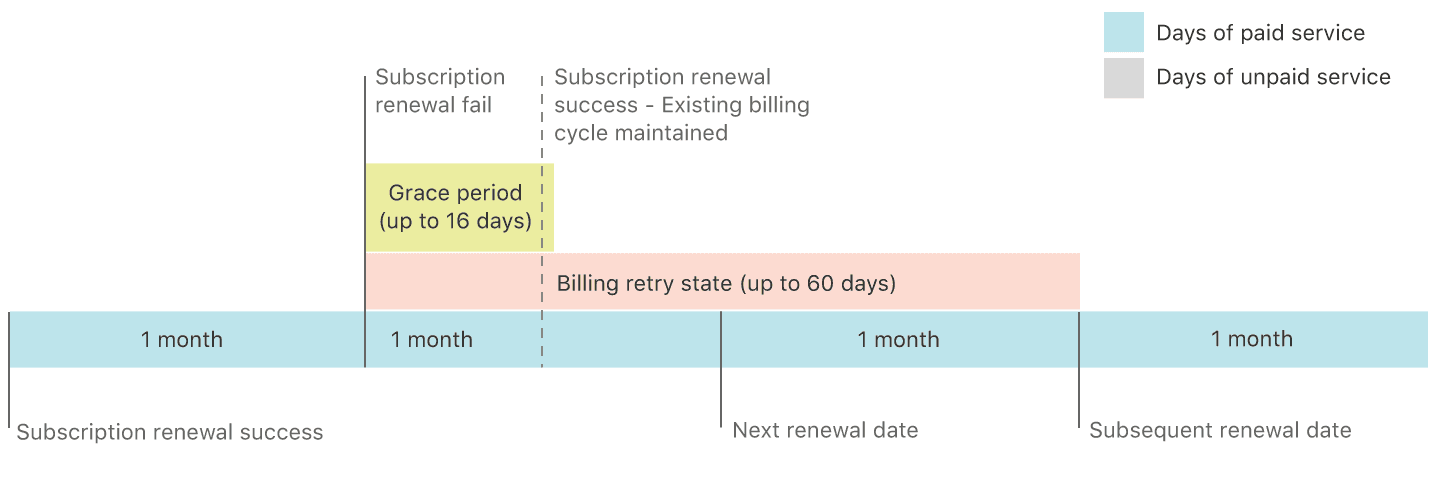
Example 1: successful subscription payment while in the Grace Period
Upon the end of the first auto-renewable period, Apple was not able to collect the payment. Usually, this would instantly move the client into the Billing Retry status and block their access (same question as above) to the app. However, if the Grace Period has been enabled, then the user can still access the premium features for a specified period. If Apple collects the payment at one of the subsequent attempts while the user is still in the Grace Period the existing payment cycle is not interrupted.
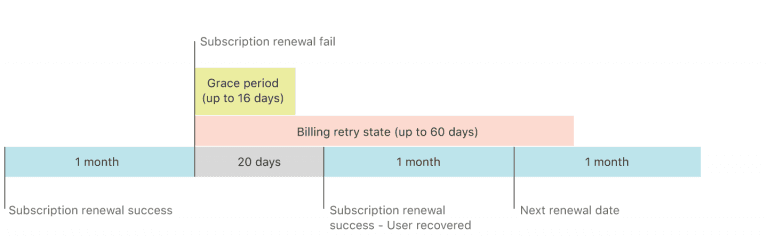
Example 2: payment did not go through during the Grace Period
In the second example, Apple was unable to collect the payment during the Grace Period, which led to changes in the current billing cycle. The client moved into the Billing Retry status with blocked access to the app. Later,e to collect payment, if Apple is abl a new auto-renewable payment cycle is launched starting from the actual payment date.
After enabling the Grace Period option in the app settings, the JSON response you get when validating the payment receipt will include an extra field:
This field shows the expiration date of the premium content access.
Right after a successful payment has been made, this field will disappear together with
The field that will show you when the subscription expires is expires_date_ms, which is received from
If the payment did not go through in 60 days, the fields
and
disappear from the receipt, and you will able to use
but in this case, the subscription has expired with the field
being equal to 0.
Ways to implement the Grace Period in your product
If a billing issue has been detected, it might be a good idea to notify users about it within the app and remind them to update their billing information with the App Store.
You can validate user receipts on your server to catch the billing retry state and check if a user is currently in the Grace Period. You can also try Qonversion for that and save yourself some time to work on your product. With Qonversion, all you’ll need to do is to implement the code below:

Sam Mejlumyan
CEO of Qonversion
Sam is an entrepreneur and CEO of Qonversion – the in-app purchase platform which processes over $1 billion tracked revenue yearly. With deep expertise in subscription management and a passion for driving data-driven strategies.