Apple App Store Connect provides a simple way to monetize your app with in-app purchases (IAPs). The rule is simple, if you are providing digital goods or services you must use in-app purchases. Apple handles the payments and pays out the sales amount minus the commission also known as Apple tax. Apple commission is 30% but it is reduced to 15% for subscribers that have been with your app for more than a year.
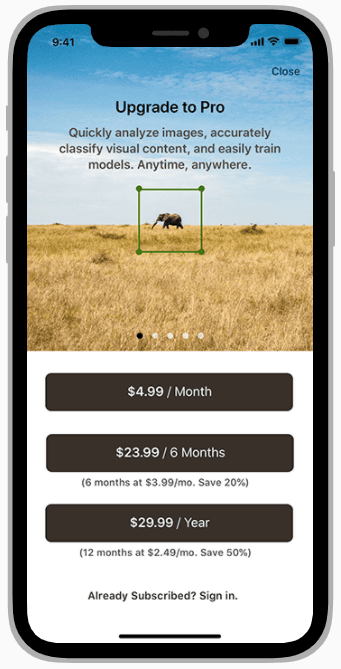
In-app purchases allow you to monetize your app in 175 countries without considering the payment infrastructure in any of these countries. It would be impossible for most developers to distribute apps in more than one country if they had to handle the payments themselves. However, the convenience and scale of Apple’s distribution platform come with a price: Apple commission.
What can you offer with in-app purchases?
Any digital goods and services can be monetized with in-app purchases. Here are just some of the app categories you can find in the App Store monetizing with IAPs: streaming services, health & fitness, education, photo & video, productivity, social networking, sports, games, and many others. You can check the complete list here.
Can I use third-party acquiring like Stripe to monetize digital goods in my app?
The answer is no. That goes against Apple’s policy of requiring the use of IAPs for digital goods monetization. If you do, Apple will remove your app from the App Store, as happened with Fortnite recently.
For example, you can use a third-party acquiring solution outside of your app on your web landing. However, you can not promote this payment method inside your app or direct users to it from your app.
In-app purchases types
Apple provides a range of in-app products that are suitable for different cases. There are four main in-app types:
- Consumable
- Non-consumable
- Auto-renewable Subscriptions
- Non-renewing Subscriptions
Consumable in-app purchases
These IAPs can be used once; they are depleted and can be purchased again. Consumable IAPs are most frequently found in mobile games. They are usually linked to coins or gems that users purchase to spend on some virtual ammunition or other enhancements in a match.
Non-consumable in-app purchases
Non-consumable purchases are not depleted, as the name implies. With non-consumable purchases, you can unlock some premium features in your app, like a set of photo filters, fonts, and digital lessons.
Auto-renewable subscriptions
Apple provides the infrastructure to turn your app into a subscription-based business with auto-renewable subscriptions. This type of in-app product was initially introduced for digital magazines, but it has been widely adopted across all verticals. Non-gaming apps mostly use subscriptions, but games are also increasingly turning to subscriptions. You can look at our article on the top-grossing subscription apps on the App Store.
Apple recommends that if you monetize with a subscription, you should update your app with new features and content to justify the recurring payments.
Available subscription durations are:
- One week
- One month
- Two months
- Three months
- Six months
- One year
Each specific subscription must be assigned to a subscription group. A subscription group can contain subscriptions of different durations, prices, and access levels so your users can choose the best option for their needs. A user can subscribe only to one subscription in a group. Most apps should stick to one subscription group to avoid accidentally selling several subscriptions to one user. You can create separate subscription groups if you need multiple subscriptions, for example, for different streaming channels.
If you have more than one subscription in a group, each subscription can be assigned to a level. This level will be used if users want to downgrade or upgrade their access. You should rank subscriptions in descending order, with level 1 assigned to the broadest access level.
Users can manage subscription options like auto-renewal and upgrade in their App Store account settings.
Subscription pricing
You can choose from 200 price points for each territory where you plan to distribute your app. Apple will subtract the applicable value-added tax (VAT) from the sales price.
Introductory Offers
You can provide your users with an introductory offer so they can test your app at a discounted price or for free before subscribing. Free trials can last three days, 1 or 2 weeks, and 1, 2, 3, 6 months, or even a year. Users are eligible to redeem only one introductory offer per subscription group. Users can turn off auto-renewal options in their account settings during the trial. Otherwise, the trial will convert into a subscription, and the user will be automatically charged the regular subscription price.
Promotional Offers
You can provide promotional offers to your lapsed subscribers. For example, you can offer a monthly subscription at $ 5$ a month for six months, and it increases tolue of $10 tha your regular van the price.
To conclude our auto-renewable subscription overview, here is a good video overview of the subscriber journey from Apple’s WWDC 2020 conference.
Non-renewing subscriptions
You can provide limited-time premium access, like a season pass with a non-renewing subscription. This product does not renew automatically. Users can renew the subscription on their own.
Implementing and testing the in-app purchases
Let’s review some things you must remember when implementing in-app purchases.
Apple provides StoreKit to implement in-app subscriptions. However, the process is quite laborious and drives a lot of complexities for an app. Specifically, validating user receipts using your backend would be best. That’s why you might want to consider a 3rd party service, like Qonversion, to implement subscriptions.
A user receipt istime of the first transaction. The App Store receipt contains the data on purchase. It’s an encrypted file with an Apple certificate. You can read the details on the receipt structure here. You can validate the purchase status directly with Apple at any time using a receipt created at the. Check out our receipt validation tool here.
The App Store can notify your server once the in-app subscription changes its status. Some examples of server notifications are subscription auto-renewal state changes, trial converted; and subscription went into billing retry state.
Testing in-app purchases is a significant part of the in-app implementation. It got notably easier to test in-app purchases on iOS 14. Apple has introduced the following features in Xcode 12 and iOS 14:
- StoreKit Configuration File – to set up the in-app products for testing in Xcode without creating them in App Store Connect.
- StoreKit Transaction Manager – to see in-app purchases locally and manage their statuses in Xcode;
- StoreKitTest Framework – a framework for running tests in Xcode.
- Sandbox subscription management on the device.
Please read our guide on testing in-app purchases on iOS 14 and XCode 12 here. And here is our error handling guide for in-app purchases.
Use TestFlight before sending your app for review with Apple.
Testflight allows you to distribute your app to a set of test users. They can test all aspects of an app, including sandbox in-app purchases. It will enable you to quickly catch and fix any unexpected behavior or bugs, pass Apple reviews, and delight your users.
Publishing an app with the App Store
Before publishing, you should also familiarize yourself with Apple’s review guidelines. You can find the details here. Your in-app purchases are reviewed separately from your app. Think carefully about how you offer a user an in-app subscription or purchase. If you provide detailed onboarding in your app that explains your app's value and main use case, you can offer an in-app subscription, ideally with a promo offer right after your onboarding. Here, you can check out over seventy onboarding flows from the most popular subscription apps.
Closing thoughts
Apple built a fantastic platform to distribute and monetize mobile apps. There are many things to consider when monetizing with in-app purchases, though backend infrastructure for receipt validation, testing in-app purchases, pricing of your in-app products, App Store review process, and many others. We at Qonversion are building the tools to make working with in-app purchases easier, so you might want to try us.
If you find this post useful or have any questions, I’d love to hear from you! You can post your question on our discussion boards or shoot us an email. For more mobile app-related content, follow us on Twitter!

Michael
CEO at Qonversion
Michael leads Qonversion with a vision to help mobile apps maximize their subscription revenue.